From time to time you may need to reset the soft close function of the drawer runners. This can be needed if the drawer has been removed for cleaning or perhaps an item has fallen between the drawer and the chassis.
If you are having trouble fully closing or opening a drawer and it has been checked that no object inside the drawers are causing an obstruction the soft close function of the runner may need resetting. This is a simple procedure and removal of the drawer is required. This is similar to removing kitchen cabinet drawers and below will show you how to perform the task.
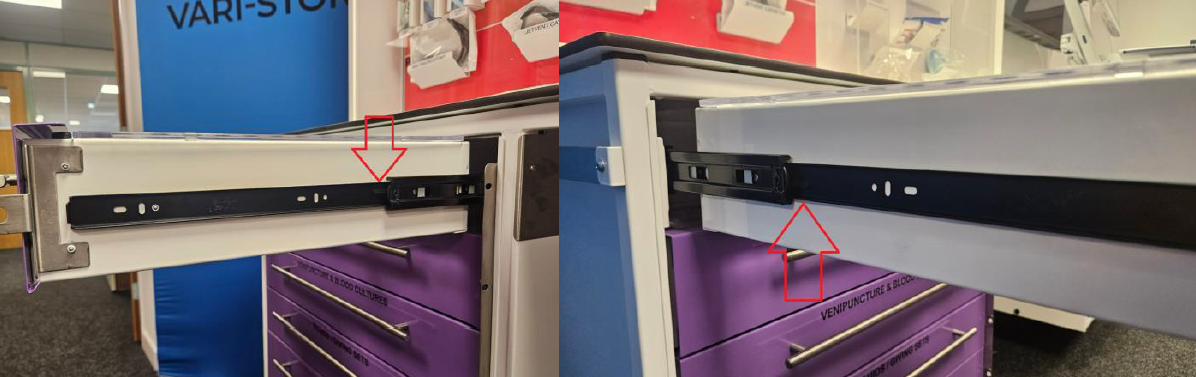
Open the drawers and locate the release tabs on each side of the runners. You will notice one side has a tab that is higher and one side a tab that is lower down. Simultaneously pushing down the high tab and up the lower tab will allow the drawer to be released and it can be slid back off the runners.
With the drawer removed the soft close latch can be seen. You need to slide the green part forward until it latches and stops as below.
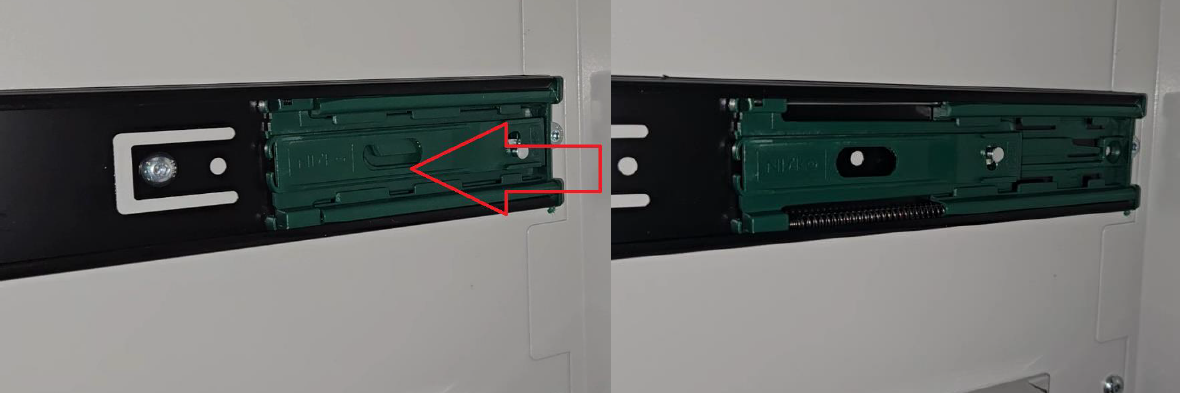
From here the drawer can be slide back on to its runners and should now fully close. Note when sliding the drawer back onto it’s runners ensure both sides are engaged equally on the runner. For larger drawers it can be beneficial to have two people to ensure both side engage correctly.
If you are still having issues after the above please contact our support team for further assistance.
Was this article helpful?
That’s Great!
Thank you for your feedback
Sorry! We couldn't be helpful
Thank you for your feedback
Feedback sent
We appreciate your effort and will try to fix the article